Analysis of Meta Fashion Item Characteristics and 3D Digital Clothing Programs: Focusing on ZEPETO Platform

©2024 The Korean Fashion and Textile Research Journal(KFTRJ). This is an open access journal. Articles are distributed under the terms of the Creative 52 Commons Attribution Non-Commercial License (http://creativecommons.org/licenses/by-nc/4.0), which permits unrestricted use, distribution, and reproduction in any medium, provided the original work is properly cited.
Abstract
Digital clothing has emerged as a new form of creative self-expression, transcending the boundaries of physical clothing. ZEPETO, a global metaverse platform by Naver, enables users to engage with customized avatars, fueling the rise of digital fashion. This study explores the characteristics of digital clothing items on ZEPETO and offers insights into user-friendly digital clothing creation by comparing the 3D modeling software Blender and Maya. A total of 4,875 digital clothing items sold on ZEPETO were analyzed and classified by type, color, pattern, and fashion sensibility. In addition, the functions, interfaces, and modeling capabilities of Blender and Maya were examined. Key findings include differences in color distribution across categories, with achromatic tones being prominent. The main patterns used in digital clothing reflected the characteristics of the items, and various patterns were observed. In terms of fashion sensibility, active sensibility was the most prevalent, while collaborative items were significantly influenced by brand characteristics, particularly in color and pattern choices. Blender, as an open-source tool, offers extensive customization and supports various 3D operations, whereas Maya provides powerful specialized tools for creating detailed and complex models. The results highlight the strengths and limitations of each software used for digital clothing creation, aiding developers and creators in selecting the right tool according to their needs.
Keywords:
ZEPETO, metaverse, digital clothing, digital fashion, meta fashion1. Introduction
Digital clothing is virtual clothing that can be worn in digital environments such as video games, virtual reality, and augmented reality. Although it is not yet mainstream in the clothing industry, developers and creators are continuing to research digital fashion. The development of digital technology is bringing about changes to the fashion industry. It is worth noting that digital clothing is a creative form of fashion that can be worn in virtual or digital spaces, transcending the boundaries of simple physical clothing, and is an extension of self-expression(Ahn, 2022). As part of this change, the concept of meta fashion is emerging. Meta fashion refers to an innovative form of fashion that is created by combining digital technology and the real world, going beyond the concept of traditional clothing. Among the metaverse platforms, ZEPETO, a metaverse platform developed by Naver in Korea, allows users to share their daily lives through customized avatars using facial recognition, AR, and 3D technology. ZEPETO provides a reality-like experience in the virtual world and promotes the creation of digital clothing and interaction between users. Since its launch in August 2018, ZEPETO has surpassed 400 million cumulative users, of which more than 95% are overseas users, making it a so-called global metaverse platform (Kim, 2023). Digital clothing refers to clothes that can be worn on a virtual platform, and these can be worn or sold in a metaverse like ZEPETO, allowing for various interactions in the virtual space.
ZEPETO is a representative metaverse platform where you can enjoy social activities using 3D avatars. ZEPETO users can create and decorate their own avatars that reflect their individuality and directly talk with other users in the virtual world. One of ZEPETO's representative features is that users can create and use various forms of digital content consumed in the virtual space. In other words, users can freely decorate their avatars and design and sell various items such as clothes, shoes, bags, and hairstyles that the avatars wear. Digital content used in ZEPETO can be created using ZEPETO Studio, and even beginners can create items in a 2D environment using various templates and template editors provided by ZEPETO. The 2D creation method is simple, and anyone can easily create items, and even beginners in clothing or patterns can create digital clothing professionally. In addition, you can freely create more high-level items using professional 3D modeling programs such as Blender, Maya, and 3D Max.
However, there are significant differences between the patterns used in specialized pattern-making programs like 3D CLO or VSTITCHER and those used in ZEPETO. 3D CLO and VSTITCHER operate by inputting 2D patterns, converting them into 3D, and then simulating them on an avatar. These programs closely resemble the actual garment production process, allowing for the design of digital clothing with precise simulations that realistically replicate the fitting and movement of real-world garments(Särmäkari,2023). In contrast, ZEPETO's digital clothing is directly created through 3D modeling, with the design process focusing more on 3D forms and visual aesthetics rather than traditional pattern-making. This approach highlights ZEPETO's emphasis on visual impact and individuality in the virtual space, relying more on 3D modeling techniques than on conventional pattern-making processes.
Accordingly, this study examines the characteristics of digital clothing items sold and provided on the metaverse platform ZEPETO, and compares and analyzes general-purpose 3D modeling software such as Blender and Maya that can be used in conjunction with ZEPETO Studio to identify the pros and cons of digital clothing production tools exposed in the metaverse and provide information on user-friendly digital clothing production.
2. Methods
2.1. Meta Fashion Analysis
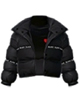
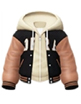
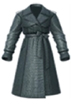
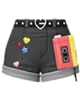
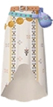
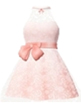
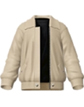
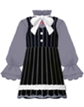
The meta fashion analysis of this study targeted digital clothing products uploaded to the ZEPETO World of the metaverse platform ZEPETO application(Naver Z Corporation, 2018), and was limited to the category corresponding to clothing among the digital clothing categories of the ZEPETO avatar settings. Specifically, a total of 4,875 items were analyzed in five categories: ‘One piece clothing (mini one piece, long one piece, costume, casual, suit)’, ‘Top (T-shirt, shirt, hoodie, crop)’, ‘Outer (short, medium, long)’, ‘Pants (short, medium, long)’, and ‘Skirt (short, medium, long)’ (Table 1).

Example of classification of ZEPETO clothing categories(ZEPETO app.)
The items used in the analysis were limited to clothing items uploaded to the ZEPETO World until September 2023, and the color, pattern, and fashion sense of each item were investigated and analyzed(Table 2~4).
Examples of colors in ZEPETO clothing(ZEPETO app.)
Examples of pattern design in ZEPETO clothing(ZEPETO app.)
Examples of fashion sensibility in ZEPETO clothing(ZEPETO app.)
2.2. 3D digital clothing modeling software
The 3D modeling software analyzed in this study was selected as Blender and Maya, which are general-purpose software also used in ZEPETO Studio(Naver Z Corporation, 2020) (Table 5), and the structural features of each program and the functional differences of the software were compared and analyzed to examine the advantages and disadvantages according to the digital clothing production process.
Company, License and platforms by 3D modeling software
The software used in the study was Blender 4.0 and Maya 2024, which are the latest versions, and their features, interface structure, and modeling menu tools were analyzed. Each of these programs is distributed under the GPL (General Public License), which allows users to freely use, modify, and distribute Blender, a free, open-source 3D computer graphics software developed by the Blender Foundation. Blender is cross-platform and is supported on various operating systems such as Linux, Windows, and macOS. The interface integrates all workspaces into a single window and provides various modeling tools and modeling workflows. It supports a variety of tasks, including 3D modeling, sculpting, rigging, animation, simulation, rendering, compositing, and motion tracking, as well as video editing and game creation. Advanced users can use Blender's API (Application Programming Interface) for Python scripting to customize the application and create special tools. Blender uses the Eevee and Cycles rendering engines, and utilizes CUDA (Compute Unified Device Architecture) and OpenCL (Computing Language) for GPU rendering(Blender Foundation, 2002). Maya is a commercial 3D computer graphics software developed by Autodesk. It mainly has official support for Windows and macOS, but it works on some distributions of Linux, but official support may not be provided, so confirmation is required(Autodesk, 2006).
3. Results
3.1. Digital Clothing Item Analysis Results
The results of the digital clothing item analysis of ZEPETO World are as follows. First, the color analysis results were classified into 12 colors as shown in Table 2, and overall, it was found to be Achromatic at 48.5%, Chromatic at 45% and Multi color at 6.5%. In detail, there were many achromatic items, with Black at 28.3% and White at 14.3%. Among the chromatic colors, Blue series was 14.6%, Pink series was 9.4% and Orange series was 1.2%, showing that Black was the main color for most items (Fig. 1).
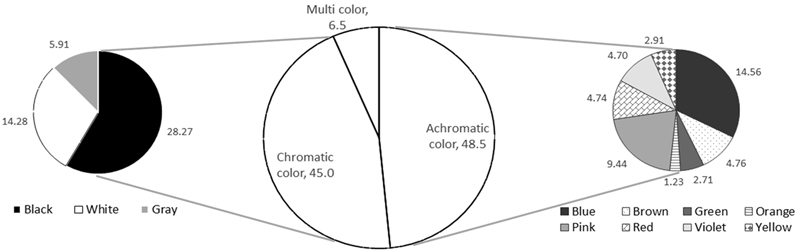
Results of color classification of in ZEPETO clothing.
When broken down by category, in ‘one piece outfits’, Pink and Blue series were the most prevalent at 13.6% each, while in ‘tops’, White 18.0%, Blue 10.3%, Pink 9.1%, Multi color 7.3%, and Gray 5.8% were in that order, and in ‘outerwear’, White 13.9%, Blue 9.0%, Brown 8.4%, Gray and Pink series each 8.0%, and Multi color 5.5%. The Pink series was mainly seen in short items with many feminine styles, the Blue series was mainly seen in medium items with many neutral styles, and the Brown series was mainly seen in long items with many mannish styles. ‘Pants’ were in the order of Blue series 24.6%, White 13.8%, Gray 7.8%, Brown series 6.0%, and Purple series 4.3%. Denim pants accounted for a large proportion of ‘pants’ items overall, so dark colors dominated, and Pink series was mainly seen in short items. In ‘skirts’, Pink series 13.7%, Blue series 13.3%, White 10.6%, Gray 7.2%, Purple series 7.9%, and Red series 6.1%, in that order. Similar to the analysis results of one piece items in ‘one piece outfits’, Pink and Blue series were seen in large numbers (Fig. 2).
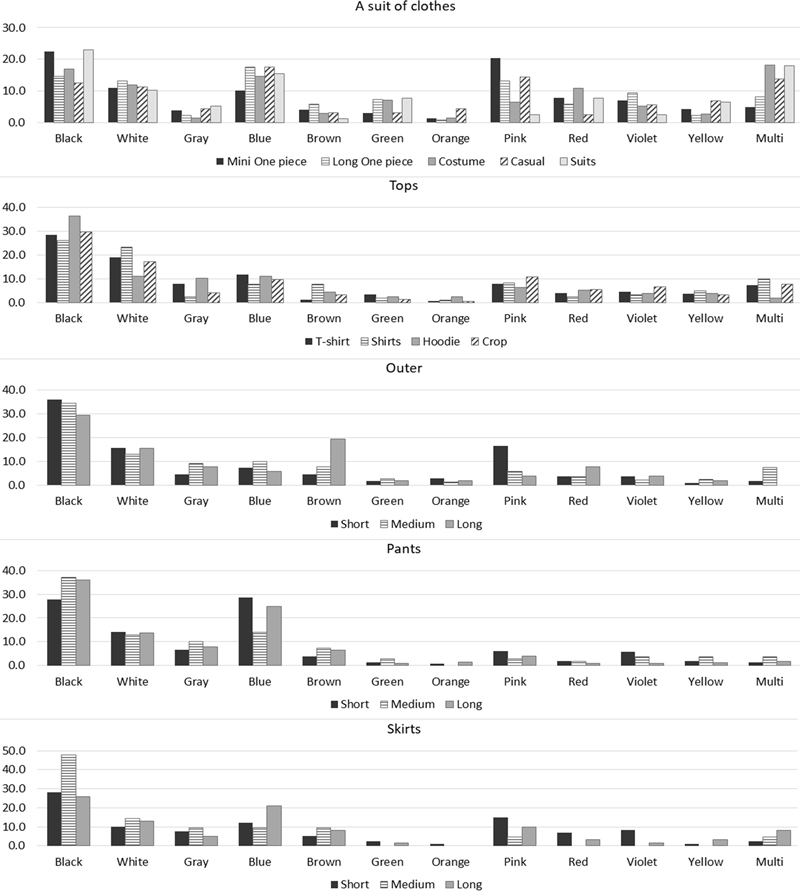
Results of color classification of in ZEPETO clothing by category.
Next, as shown in Table 3, the pattern analysis results were classified into 5 pattern groups: geometric, typography, flora and fauna, character, mixed patterns, in 47.9% of all clothing items analyzed in this study. Overall, geometric patterns were the most prevalent at 35.6%,, followed by typography patterns at 22.4%, flora and fauna patterns at 20.3%, and character at 13.9%, while mixed patterns were the least prevalent at 7.9% (Fig. 3).
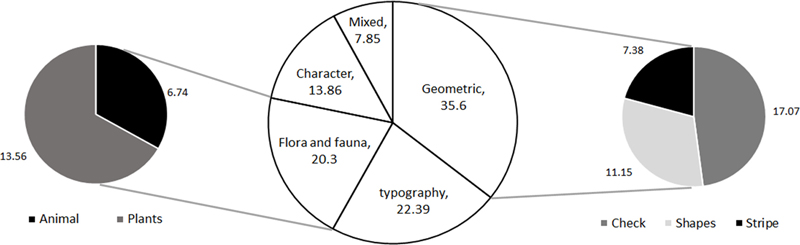
Results of pattern classification of in ZEPETO clothing.
By category, flower and fruit patterns were the most prevalent at 24.6% in ‘one piece outfits’, followed by check patterns at 17.8% and geometric patterns at 14.8%, which were prominent in one piece dresses and costume items. ‘Top’ was mostly found in T-shirts and hoodies, with letter patterns at 34.7%, character patterns at 15.5%, and flower and fruit patterns at 11.3%. ‘Outerwear’ showed 21.9% check patterns, 21.0% text patterns, and 14.2% character patterns, in that order. Check patterns were mainly found in short and long items, text patterns in medium items, and character patterns in short and medium items. ‘Pants’ showed 20.1% text patterns, 18.6% character patterns, 17.5% check patterns, and 14.6% geometric patterns, in that order. Text patterns were found in medium and long items, and character and check patterns were evenly distributed across short, medium, and long items. ‘Skirts’ showed 49.5% check, 11.0% flower and fruit, 10.0% character, and 9.5% geometric patterns, in that order. Check patterns were found in short items, and flowers and fruits were found in many medium items. Character patterns were mostly seen in medium and long items, while stripe patterns were only seen in short items (Fig. 4). The patterns of digital clothing were distributed in various ways depending on the category and item style, and each item had a unique pattern.
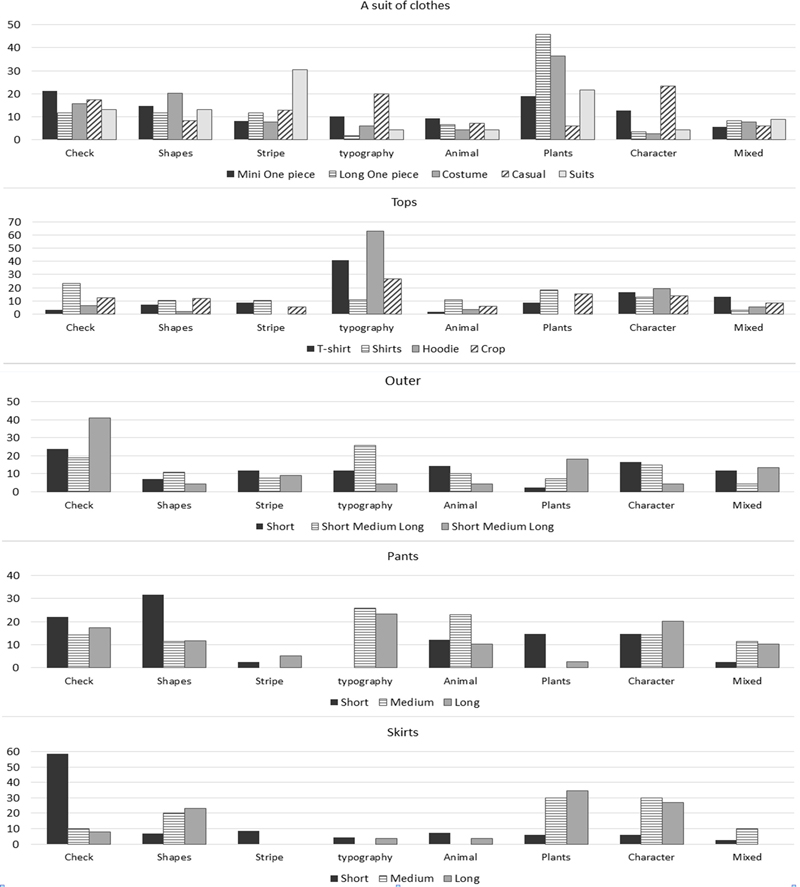
Results of pattern classification of in ZEPETO clothing by category.
Next, the fashion sensibility of the digital clothing uploaded to ZEPETO was analyzed by classifying it into three fashion sensibility groups: contemporary, heritage, sophisticated as shown in Table 4. As a result, the distribution of fashion sensibility was different for each category, but overall, Contemporary sensibility was the most prevalent at 48.67%, followed by sophisticated sensibility at 38.2% and heritage sensibility at 13.2%. In detail, active sensibility at 28.7, manish sensibility at 18.1%, and ethnic sensibility at 8.6%, respectively, as the main fashion sensibilities (Fig. 5). In the ‘one piece clothing’ category, ethnic sensibility (17.5%) was the most prevalent, and was classified in the order of romantic, active, and modern sensibilities. Ethnic sensibility was largely represented by traditional costumes among costume items, romantic sensibility was prevalent among one piece items, and active sensibility was high among casual items due to the many items in collaboration with sports brands. ‘Top’ had the most active sensibility (30.3%), followed by romantic, mannish, modern, and chic sensibilities. Active sensibility was common in T-shirts, hoodies, and crop items, romantic was common in shirts and crop items, and mannish sensibility was common in T-shirts, shirts, and hoodies. Mannish and active sensibilities were evenly distributed across all outerwear items, and romantic sensibility was particularly common in short items. ‘Pants’ had active (44.4%), mannish, chic, modern, and romantic sensibilities, leading to active sensibilities, while ‘skirts’ had romantic (25.9%), active, mannish, and modern sensibilities in that order. Romantic sensibility was most common in all skirt items (Fig. 6).
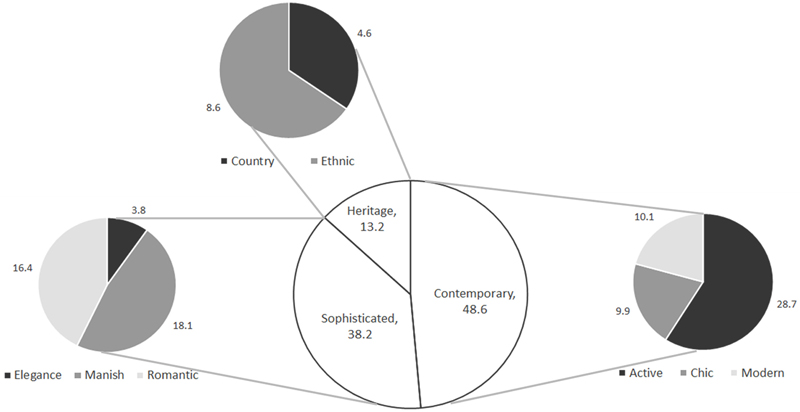
Results of fashion sensibility classification of in ZEPETO clothing.
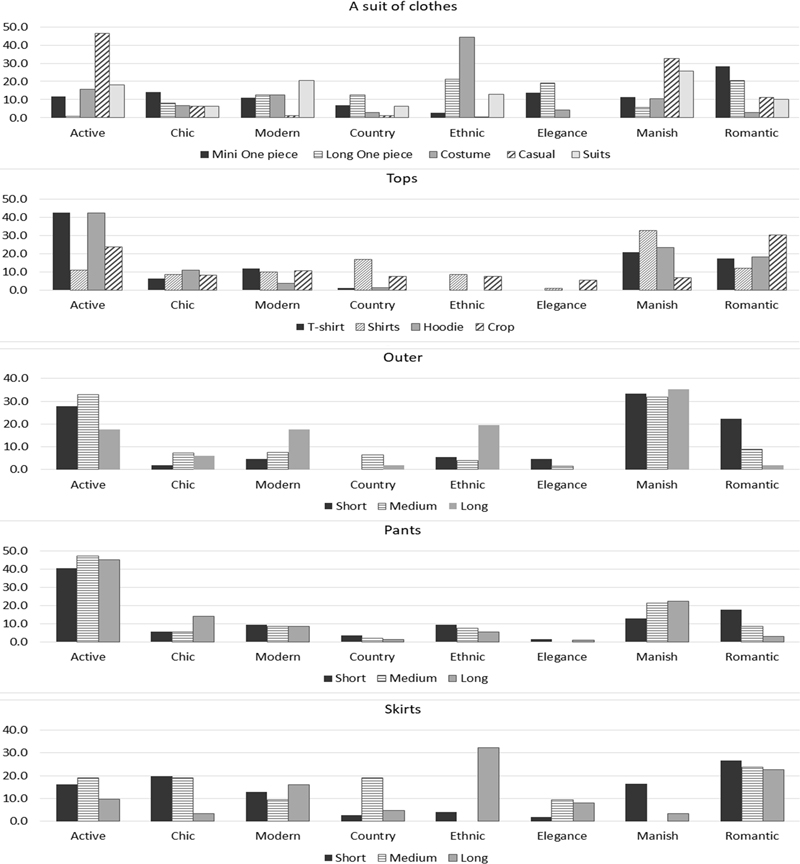
Results of fashion sensibility classification of in ZEPETO clothing by category.
3.2. 3D modeling software analysis
The results of comparing Blender and Maya, 3D modeling software, are shown in Table 6. The interface has a modular structure divided by menus and toolbars, and is used to create 3D digital content in various fields such as movies, animations, visual effects, games, and simulation development using advanced modeling techniques such as polygons and NURBS (Non-Uniform Rational B-Spline). It provides an animation tool that can create realistic moving characters using the rigging tool, and can complete 3D objects and scenes using intuitive modeling tools. In addition, it can simulate real effects such as hair and clothing shaking in fire, explosions, etc. Maya uses the Arnold rendering engine as its base, which can implement realistic lighting and material effects, can be integrated with various external rendering engines, and mainly utilizes the CPU. Blender and Maya are two software programs that provide the ability to perform various 3D tasks such as 3D modeling, animation, rendering, VFX (visual effects), and game development, and are designed to run on various operating systems. Both have large user communities, so various tutorial materials, add-ons, etc. are freely shared, and they support professional-level work, including advanced modeling and animation tools. In addition, both software programs have the common feature of supporting Python scripting and being extensible through plugins. On the other hand, Blender has a unified interface in a single window and has a relatively low learning curve, while Maya has a modular interface and may have a relatively high initial learning curve.
Analysis of of functional differences by 3D modeling software
Blender's interface is basically composed of three areas: the top bar, workspace, and timeline. The workspace displays three windows by default: 3D Viewport, Outliner, and Properties (Fig. 7).
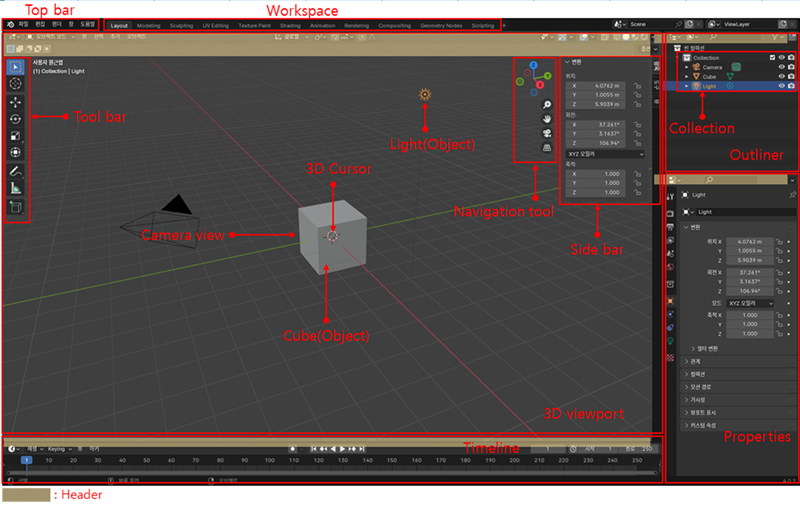
Blender’s interface.
The top menu is the main menu, which consists of basic menus necessary for Blender work, such as saving and loading files, rendering, layers, and help. In the workspace, you can edit 2D images, animation data, composition, and text, and when Blender is run, it is set to the default layout space. You can change the screen layout optimized for 3D work, including modeling, sculpting, UV editing, texture painting, shading, animation, and rendering, by selecting each menu. The 3D Viewport window is where most editing takes place, and it is the workspace where 3D modeling is performed in earnest. It consists of a header, sidebar, toolbar, and navigation tools. Here you can explore the 3D scene, transform objects, edit them, and add new objects. In the 3D viewport window, you mainly use the mouse and keyboard shortcuts to manipulate the viewpoint. The outliner window provides a list of all objects in the viewport. You can check the list of all objects in the viewport, including objects, lights, and cameras placed in the 3D viewport window. The collections in the outliner window act as groups, allowing you to group multiple objects. Using the outliner window, you can hide objects from the screen or make them invisible in the rendering results. The property editor window is one of the most frequently used editors in Blender, where various properties are displayed, and the displayed property items can be changed by clicking on the icons arranged vertically on the left. Blender's workspace is activated by placing the mouse pointer over each space, and the window size can be adjusted by dragging the border, and each window has a header that allows you to execute commands. The timeline is located at the bottom of the screen and shows the progress of the currently running task. It simply displays various information and inputs when working with Blender, such as the number of objects and polygons, memory usage, and provides information necessary for the scene about what actions the tool is taking.
Maya's interface is modular, with various panels and tools. The specific interface elements can be broadly divided into six areas: the toolbar, view panel, channel box, layer editor, slider bar, and command bar. First, the toolbar area includes the menu, menu set/status bar, shelves, toolbox, and quick layout/outliner button toolbar. In the center, there are the view panel, channel box, and layer editor, and it consists of the time slider, playback control, range slider, animation and character menu/playback option slider bar, and the command bar (Fig. 8).
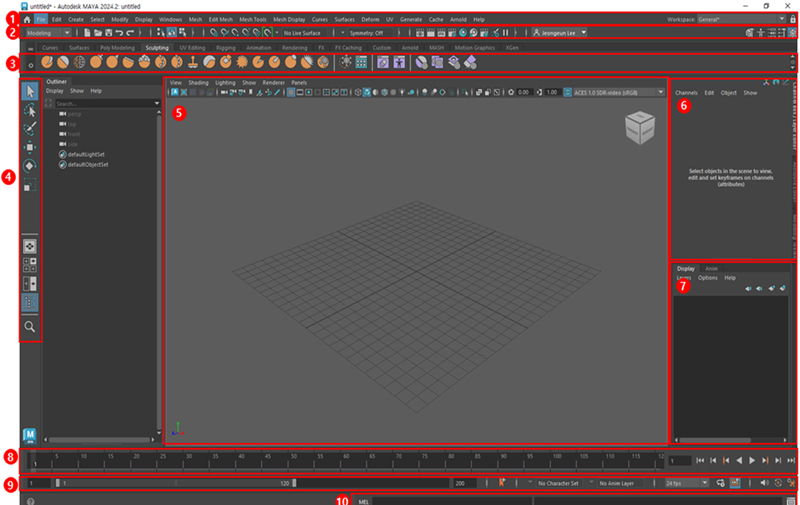
Maya’s interface. ①Menu ②Menu sets /Status line ③Shelves ④Tool Box/Quick layout and Outliner buttons ⑤View panel ⑥Channel box ⑦ Layer editor ⑧Time slider/Playback controls ⑨Range slider/Animation or character menu/Playback options ⑩command line.
There are seven menus: File, Edit, Create, Modify, Display, and Window, and all other menus change according to the menu set, such as modeling, rigging, animation, FX (Special Effects), and rendering. In the status bar, you can change the menu set, use general functions, control selection masks, set options, and change the contents of the sidebar. The shelves are divided into tabs representing the basic tool set. The tabs are divided into Curves, Surfaces, Poly Modeling, Sculpting, UV Editing, Rigging, Animation, Rendering, FX, FX Caching, Custom, SGen (Serializer Generator), Mesh, and Motion Graphics tabs, and each tab contains the most commonly used icons. The Toolbox is displayed on the left side of the Maya interface by default. It contains the most commonly used tools when working with Maya, and has shortcuts for Selection, Lasso, Selection Paint, Move, Rotate, and Scale. The Quick Layout and Outliner buttons are located below the Toolbox and can be switched to a useful panel layout with a single click. The Outliner shows a hierarchical list of all objects in the scene. The View panel is the viewing area for objects, and allows you to choose between a single panel view and multiple panel views.
The Channel Box is the fastest and most streamlined basic tool for editing object properties. It allows you to quickly change property values, set keys for keyable properties, lock or unlock properties, and create expressions for properties. The Layer Editor has tabs that allow you to display two different editors for working with different types of layers. The display layer is used to organize and manage objects in the scene, including setting visibility and selectability. The animation layer is used to blend, lock, and mute multiple levels of animation. The time slider controls the playback range, keys, and sorting. The playback control can play and step through the animation, and the playback range is displayed on the time slider. The range slider controls the playback range reflected in the time slider, and the playback start and end times are displayed. The animation and character menus are menus that allow you to quickly switch between layers. The playback options allow you to change settings related to animation playback, such as frame rate, looping, and auto-keying. The command line allows you to enter single MEL or Python commands without opening the script editor, and to switch between modes. All of Maya's interface elements can be hidden to maximize viewing space, and quick command features such as hotboxes, shortcuts, and icon menus are available. Each of Maya's panels can be resized by dragging their borders, and panels can be docked to different areas to rearrange them to your preference.
Blender includes powerful modeling tools, allowing you to perform a variety of 3D modeling tasks. Generally, mesh modeling starts with creating basic 3D shapes (cubes, circles, cylinders, etc.) and then transforms them into detailed shapes. In 3D modeling using Blender, three of the six modes that appear in the 3D viewport, Object mode, Edit mode, Sculpt mode, Vertex paint mode, Weight paint mode, and Texture paint mode, are the main modes for modeling. These modes allow you to create and edit meshes and provide various modeling tools. First, Object mode is Blender's basic mode, allowing you to adjust object data such as position, rotation, and scale, or add and copy new objects. It can be used for all 3D objects and is mainly used to configure 3D scenes, object placement, and animation. It provides nine menus: Select, Cursor, Move, Rotate, Scale, Annotation, Scale, and Add Cube. Next, Edit mode has most of the functions for editing meshes that are used most in modeling and can be rendered. Edit mode can be executed by selecting the vertices of polygons or 3D curves of cubes or characters, and there is no Edit mode option for objects. Edit mode has many tools used for adding, deleting, and moving vertices in modeling. Various editing tools in the header and toolbar can be used to select and edit vertices, lines, and faces, and a total of 11 menus are provided: local extrusion, face inset, bevel, loop cut, knife, poly build, spin, smooth, edge slide, shrink/expand, shear, and lip regions (Table 7).
Object mode and Edit mode tools of Blender
Finally, Sculpt mode is a method for editing objects in a sculpting manner using brushes rather than modeling using vertices, lines, and faces of meshes. It can be said to be a more intuitive method than Edit mode. The mouse cursor changes to a round shape similar to the brush tool in Photoshop. The toolbar has various tools and brushes for manipulating meshes and creating more organic shapes. Each brush has a different appearance depending on its own special algorithm (Table 8).
Sculpt mode tools of Blender
In addition, modeling tools such as Mirror Modifier, Subdivision Modifier, and Retopology can be used. The Mirror Modifier creates an inverted version by mirroring the selection across one axis of the object. Many modeling tasks involve creating symmetrical objects, which makes the work simple and efficient by updating the mirror in real time during editing. The Subdivision Modifier adds more points to the line and comes in two types: the Catmull-Clark type, which is the default option, which subdivides and smoothens the surface, and the Simple type, which only subdivides the surface without smoothing. Retopology is the process of simplifying the topology of a mesh to make it cleaner and easier to work with. If the mesh is deformed in any way, it may be necessary to retopologize the mesh. Retopology can be done manually by manipulating the shape in Edit mode or through automated methods.
Maya can be used for most 3D creations using a powerful modeling toolset. Modeling is the cornerstone of 3D, and in Maya, it basically creates shapes made up of mathematical and geometric elements such as polygons and NURBS (Non Uniform Rational Basis Splines). Polygonal modeling uses coordinates between areas of an object, while NURBS modeling uses coordinates between points of a geometric object. The modeling tools in Maya can be seen in the menu set, which can be divided into Modeling, Rigging, Animation, FX, Rendering, and Custom. The Modeling menu set consists of the Mesh, Edit Mesh, Mesh Tools, Mesh Display, Curves, Surfaces, Transform, UV, and Create menus. In contrast to the Mesh and Mesh Edit menus, where everything is an action, the Mesh Tools menu allows you to input a specific tool, perform an interactive operation on the mesh, and then commit/execute the operation to actually edit the mesh. This menu includes tools such as Quad Draw, Multi-cut, and Insert Edge Loop, all of which use an interactive preview to guide you through your actions once activated. The Rigging menu set consists of the Joint, Skin, Transform, and Constraint Control menus. In the Joint tool, you can change and modify the angle and direction by selecting the joint option. The Animation menu set consists of the Key, Playback, Audio, Visualization, Transform, and Constraint menus. The FX menu set consists of the Particle, Fluid, Cloth, Hair, Constraint, Cache, Field/Solver, Effect, and Mesh menus. The Rendering menu consists of the Light/Shade, Material, Render, Shadow, and Stereo menus. Finally, you can set the menu set by selecting the menu you want (Table 9).
Maya menu set for modeling
4. Conclusion and Discussion
As a result of analyzing the colors, patterns, and fashion sensibilities of digital clothing items in ZEPETO, there were differences in color distribution by category, but achromatic colors such as black and white were dominant, and colors in the blue and pink series also appeared in a high proportion, suggesting that these colors are popular in digital clothing. The main patterns used in digital clothing reflect the characteristics of the item, and various patterns such as letters, checks, characters, flowers, and fruits existed in ZEPETO clothing. In terms of fashion sensibilities, active sensibilities were the most mainstream, and romantic and mannish sensibilities were also among the main fashion sensibilities. In addition, ZEPETO also provided items in collaboration with 132 brands such as fashion beauty products, food and beverage products, influencers and famous celebrities, and cartoon animations, showing that the characteristics of the brand have a great influence on the colors and patterns of items.
Comparative analysis of 3D modeling software for digital clothing shows that Blender and Maya are both powerful 3D modeling software, providing various functions and tools and widely used for creating 3D digital content. In terms of form, Blender has a single window integrated interface, which allows for a low learning curve and intuitive use. On the other hand, Maya has a modular interface and is more complex, but allows for detailed work through various panels and tools. In terms of functionality, Blender allows flexible modeling through various modes such as Object Mode, Edit Mode, and Sculpt Mode, and provides tools such as Mirror Modifier, Subdivision Modifier, and Retopology. Maya allows for sophisticated geometric modeling through polygonal and NURBS modeling tools, and supports interactive work through tools such as Quad Draw and Multi Cut. In terms of extensibility and community, both software support Python scripting, can be expanded through plugins, and have a large user community.
When comparing the analysis of digital clothing items in ZEPETO World and 3D modeling software, the two softwares provide tools that can efficiently produce various clothing items on digital platforms such as ZEPETO through their respective strengths. The diversity of colors and patterns of ZEPETO, as well as the distribution of fashion sensibilities, can be implemented through various modeling tools. Specifically, Blender's Sculpt mode is advantageous for expressing organic patterns such as flower and fruit patterns, while Maya's NURBS modeling is suitable for implementing sophisticated patterns such as letter patterns.
In conclusion, if Blender and Maya's functions are appropriately utilized in creating items in ZEPETO World, high-quality digital clothing that reflects various colors, patterns, and fashion sensibilities while complementing each other's functions can be created. This will provide users with more choices and contribute to enhancing the competitiveness of the platform through items that can express individuality. The results of this study are expected to help digital clothing designers and metaverse platform developers develop digital clothing products and provide useful digital clothing information to metaverse platform users.
References
-
Ahn, S. K. (2022). Buying virtual fashion Items in the metaverse - Focusing on self-regulatory focus. The Korean Fashion and Textile Research Journal, 24(6), 707-718.
[https://doi.org/10.5805/SFTI.2022.24.6.707]

- Autodesk. (2006). Maya Help. Autodesk Maya. Retrieved January, 15, 2024, from https://help.autodesk.com/view/MAYAUL/2024/ENU/?guid=GUID-F4FCE554-1FA5-447A-8835-63EB43D2690B
- Blender Foundation. (2002). Blender 4.0 Manual. Blender. Retrieved January, 15, 2024, from https://docs.blender.org/manual/ko/4.0/?utm_source=blender-4.0.2
- Kim, S. H. (2023, Jun 20). What happened to those metaverse platforms? ZDNET Korea. Retrieved Jun 23, 2023, from https://zdnet.co.kr/view/?no=20230620101438
- Naver Z Corporation. (2018). ZEPETO [Mobile Application] Google Play Store. Retrieved September 14, 2023, from https://play.google.com/store/apps/details?id=me.ZEPETO.main
- Naver Z Corporation. (2020). ZEPETO Studio Guide. ZEPETO Studio. Retrieved January, 15, 2024, from https://docs.ZEPETO.me/studio/lang-ko/docs/welcome
-
Särmäkari, N. (2023). Digital 3D fashion designers: Cases of Atacac and the Fabricant. Fashion Theory, 27(1), 85-114.
[https://doi.org/10.1080/1362704X.2021.1981657]